
This article explains how athletes perform the Quick Recovery Test (QRT), a three-minute recovery test, on their own in the Firstbeat Sports: Athlete app. The QRT in the Athlete app is available in all subscription tiers.
Before you start
- You wear a Firstbeat Sports Sensor, and the Sensor is recording.
- Test at the same time before training every time, in a calm environment, with no physical activity, caffeine or heavy meals before the test.
Steps
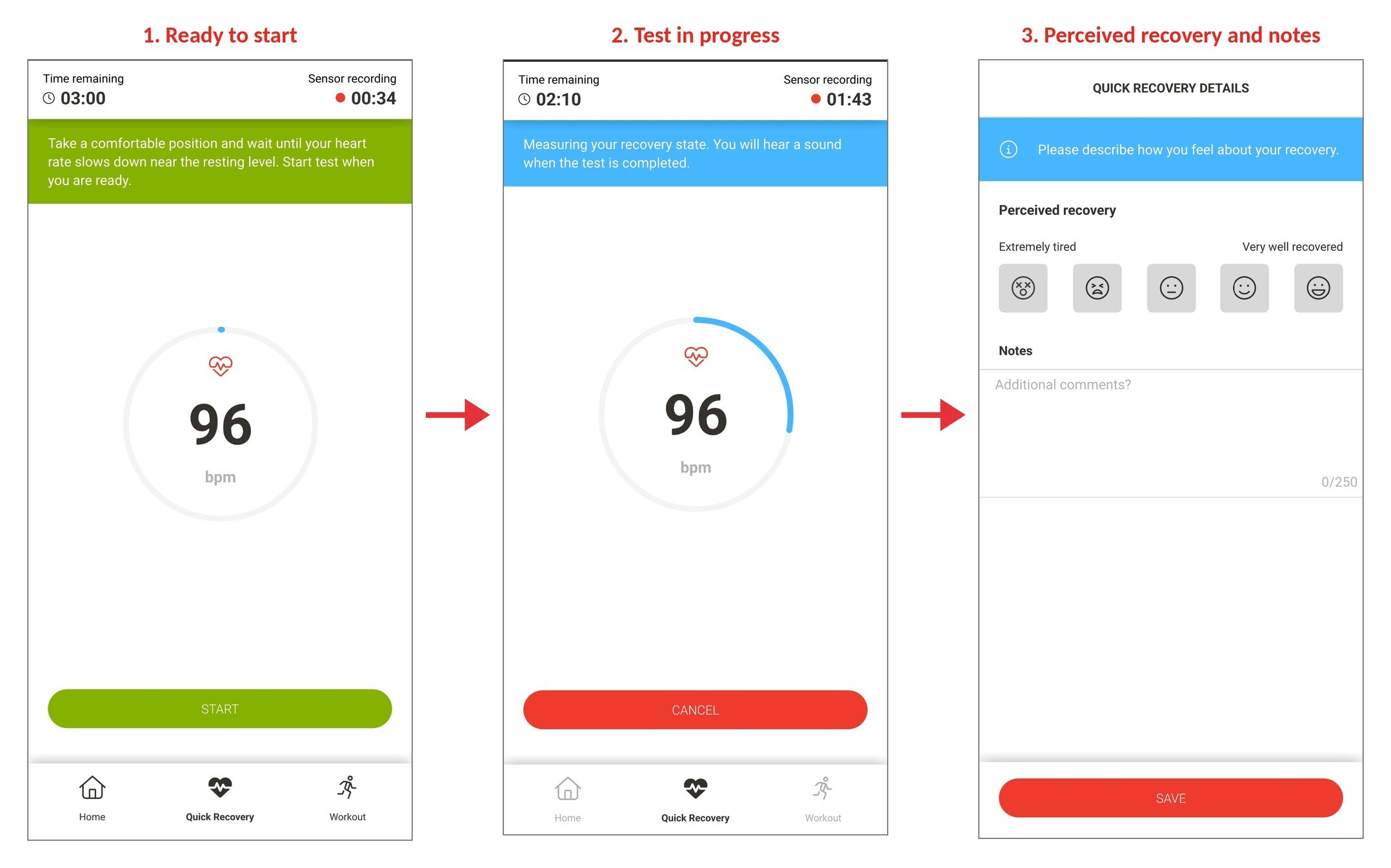
Screenshot: the QRT in the Athlete app: 1. ready to start, 2. test in progress, 3. perceived recovery and notes.
- Open the test. Tap Quick Recovery in the bottom navigation bar.
- Start the test. Take a comfortable position and wait until your heart rate slows down near your resting level. Then tap START to start the three-minute measurement.
- Monitor data quality. If an error message appears, follow the next steps in the message. To stop the test, tap CANCEL, then tap START to restart the test from the beginning.
- Add your notes. When a sound signals the end of the test, select your perceived recovery, add any notes and tap SAVE.
Result
The Athlete app uploads the QRT result to Firstbeat Sports Cloud immediately after the test.
Need more help? Ask the Customer Agent chat on this page or email support@firstbeat.com.