
This article explains how to fix the problem when the Firstbeat Sports: Coach app or the Firstbeat Sports: Athlete app does not find the Firstbeat Sports Sensor.
Symptom
The Sensor is not visible in the app, and the app cannot connect the Sensor to an athlete profile.
Cause
- The Sensor is paired with another device through Bluetooth, which hides the Sensor from the apps.
- The Coach app shows only unpaired Sensors and Sensors of athletes in the selected team.
- Bluetooth or location services are off on the mobile device.
Solution 1: Check the Sensor
- Check the light. Press the Sensor pins and check that the Sensor LED starts flashing.
- Reset the Sensor. Remove the battery for 10 seconds, check the Sensor for damage or water and put the battery back.
- Replace an old battery. If the battery is old, put in a new CR2025 battery and try the app again.
Solution 2: Select the correct team in the Coach app
- Select the team. Tap the team icon in the top-left corner of the Coach app and select the team of the athlete.
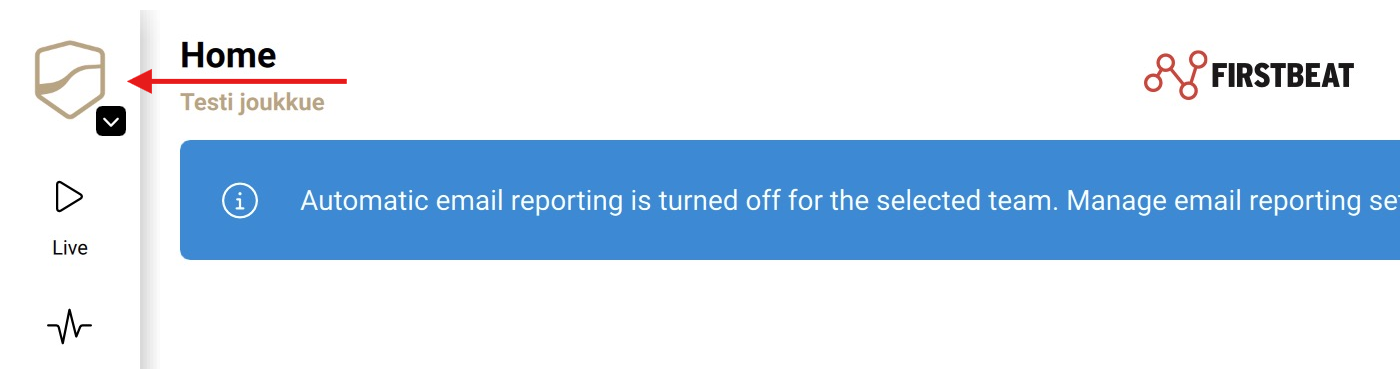
Screenshot: the Coach app with the team icon in the top-left corner.
- Check other teams. If the Sensor is paired to an athlete in another team or account, or to a deleted profile, ask the coach of that team to unpair the Sensor, or do a factory reset (Solution 6).
Solution 3: Remove the Bluetooth pairing from other devices
- Find the Sensor. On each phone, tablet and watch within range, open the Bluetooth settings and look for the serial number on the back of the Sensor.
- Remove the pairing. If a device is paired with the Sensor, remove the pairing (for example Forget This Device). Do not pair the Sensor in the Bluetooth settings. If you cannot find the device, turn off Bluetooth on all devices within range.
Solution 4: Turn on Bluetooth and location services
- Turn on both settings. Turn on Bluetooth and location services on the phone or iPad, and allow the app to use the location.
- Restart the device. If the app still does not find the Sensor, restart the phone or iPad.
Solution 5: Move away from other devices
- Move away. Move at least 200 meters away from other Bluetooth devices.
- Restart the Sensor. Remove the battery for about 10 seconds, put the battery back and check the app again.
Solution 6: Factory reset the Sensor in the Coach app
A factory reset permanently deletes all profiles, measurement data and pairings on the Sensor. Download the data first, if possible.
- Open the reset. In the Coach app, tap ... More > Support > Sensor factory reset.
- Reset. Enter the Sensor ID, which is under the battery cover next to the QR code, and tap Reset sensor.
- Pair again. When the reset is complete, pair the Sensor with the athlete again.
If the problem continues
The Sensor might be faulty. Fill in the faulty device form. For other questions, ask the Customer Agent chat on this page or email support@firstbeat.com. Include as much information as possible to help us solve the issue faster.