
The Training Summary Report, also called the Weekly Report, is a report in the Reporting Tool of Firstbeat Sports Cloud that summarizes the recent training of a team, a position or an athlete. The Training Summary Report requires the Sports Premium+ subscription tier.
General overview
- The top of the report shows the team name, the Weekly Training Summary title, the Date and the number of Athletes.
- The share icon in the top-right corner sends the report automatically on selected days or sends the current report.
Training History
The Training History chart shows the last 12 weeks of training as training impulse (TRIMP), a cumulative variable that describes training load.
- Golden bars: the TRIMP sum for each day.
- Black line: the Acute load, the TRIMP sum of the last 7 days.
- Grey area: the Balanced range, the Chronic Load (28-day TRIMP sum divided by 4) multiplied by 0.8 to 1.3.
- Red dots: Game / Race.
- Blue area: the selected 7 days.
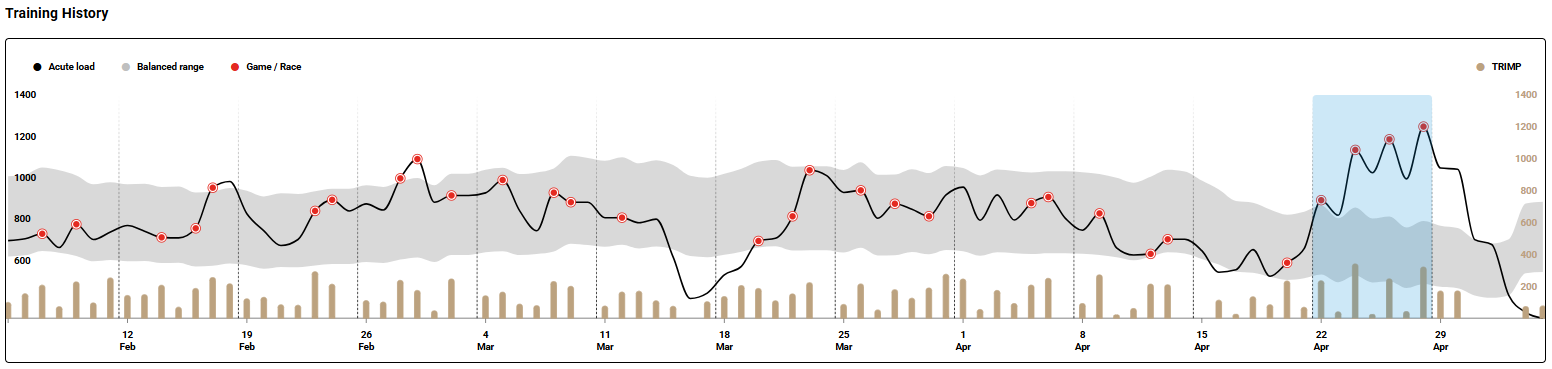
Screenshot: the Training History chart with 12 weeks of TRIMP bars, the Acute load line, the Balanced range and the selected 7 days in blue.
Weekly Values
- The Team TRIMP and Team Training Effect charts show the last 7 days.
- Bars show the team average (aerobic and anaerobic average for Training Effect). Dots show individual athletes. Hover over a dot to see the athlete and the value.
Athletes
Switch between the list view and the tile view with the icons in the top-right corner of the section. Each athlete shows:
- Quick Recovery (7D): the 7-day average Quick Recovery Score, which shows how well the athlete copes with the training load.
- Acute load with 7-Day change: the current load as a black dot, the optimal range as a dark grey area, the athlete's recent maximum in light grey and the change from 7 days ago.
- Load ratio: the acute-to-chronic load ratio, which shows whether the training load is balanced.
- TRIMP and Training Effect minibars: a quick check of whether the training week went as planned.
Athlete view
Click the team logo in the top-left corner and select an athlete or a position, or select an athlete in the Athletes section. The individual Training Summary shows the Training History, TRIMP and Training Effect charts.
Need more help? Ask the Customer Agent chat on this page or email support@firstbeat.com.