
This article explains how coaches can create laps in Firstbeat Sports Cloud with the Lap Management tool. A lap is a selected time period within a session, for example a drill, for the athletes you select.
- Use the same lap name for similar laps in different sessions. In Data Export, you can then filter by lap name to compare the laps over time.
- If you use the same lap name several times in one session, Sports Cloud numbers the laps automatically.
Video: how to create, name and analyze laps with the Lap Management tool in Sports Cloud.
Before you start
- Lap Management in Sports Cloud requires Sports Premium or Sports Premium+.
- The training session must exist in Sports Cloud. Laps are created within a session.
Steps
- Open the session. Log in to Sports Cloud at https://sports.firstbeat.com, select the day and select the session below the main chart.
- Select the time period. Highlight the time period in the heart rate chart. The lap tools open below the chart, where you can adjust the Start, End or Duration or zoom in and out.
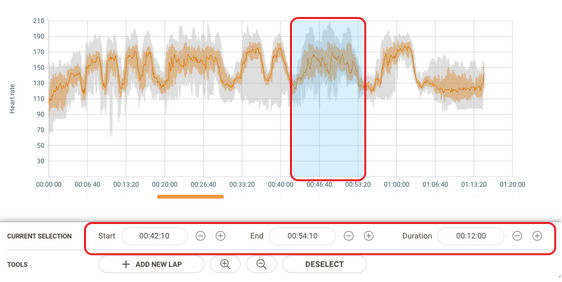
Screenshot: a highlighted time period in the heart rate chart with the lap tools, including Add New Lap and Deselect, below the chart.
- Name the lap. Click Add New Lap, check the Start time, End time and Duration, enter the Name and click Next.
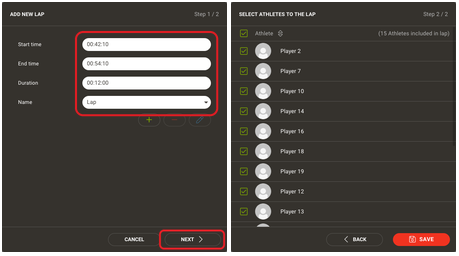
Screenshot: the two steps of the Add New Lap dialog: lap times and name, then athlete selection.
- Select athletes and save. Select the check boxes of the athletes in the lap and click Save.
To close the lap tools without creating a lap, click Deselect.
Edit a lap
- Open the lap. In the Ranking table, click the cogwheel icon in the lap row, or select the lap marker under the heart rate chart.
- Save the changes. Make the changes and save the lap.
Result
A lap marker appears under the heart rate chart, and a lap row with the results appears in the Ranking table. Expand the lap row to see the results of each athlete.
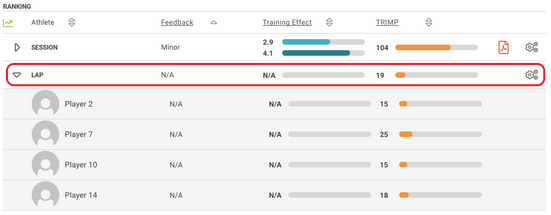
Screenshot: the Ranking table with a session row followed by an expanded lap row.
Need more help? Ask the Customer Agent chat on this page or email support@firstbeat.com.