
This article explains how coaches analyze a Submaximal Fitness Test (SMFT) afterwards in the Fitness Testing tool of the Reporting Tool in Firstbeat Sports Cloud. If you recorded the test but forgot to start the test in the Firstbeat Sports: Coach app, analyze the test afterwards in Sports Cloud with these steps. You do not need Firstbeat Support.
Before you start
- Your subscription includes the submaximal testing add-on.
- At least one Submaximal Fitness Testing protocol exists.
- The athletes' measurements from the test day are in Sports Cloud.
Steps
- Open Fitness Testing. Log in to Sports Cloud at https://sports.firstbeat.com, click MENU > REPORTING and click the Fitness Testing icon (a heart rate line) in the left icon panel.
- Select the protocol. Click ADD NEW REPORT, select the protocol of the test and click NEXT.
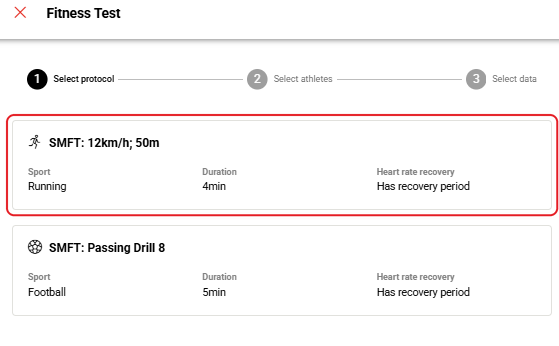
Screenshot: the Fitness Test window at the Select protocol stage with the protocol cards.
- Select the date and athletes. Select the test date in the Date field, select the athletes and click NEXT.
- Set the test period. If all athletes started at the same known time, enter the time in Start time (Optional). Under 2. Review & Adjust Test Period, adjust each athlete's test period with the slider below the chart or the Start time and End time fields; the Movement Intensity data in the chart helps find the start to the second.
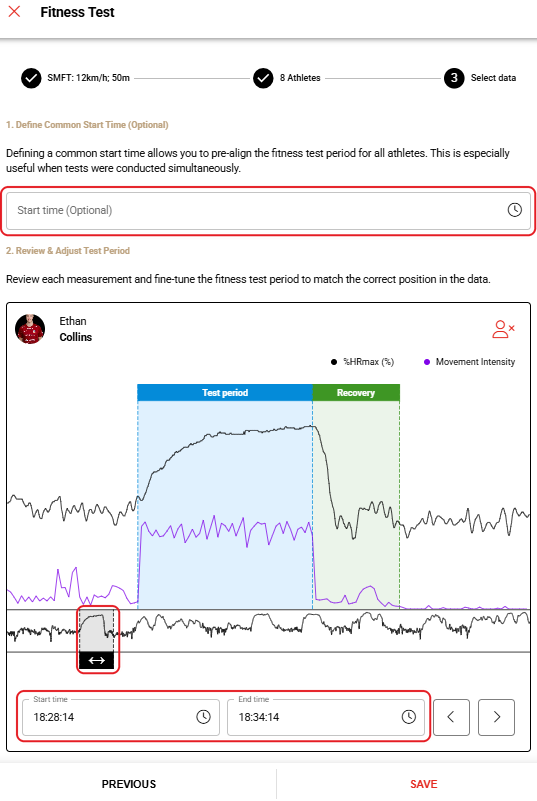
Screenshot: the Select data stage with an athlete's %HRmax and Movement Intensity chart and the test period slider.
- Save the report. Click SAVE.
- Open the report. In the Reports table, click the open icon in the Actions column. To change the report settings, click the edit icon (pencil) instead. To find a report, click Add Filter in the top-right corner and filter by Protocols or Date Period.

Screenshot: the Reports table with the edit and open icons in the Actions column and the Add Filter button.
Result
The Submaximal Fitness Test Report opens from the Reports table on the Fitness Testing page.
Need more help? Ask the Customer Agent chat on this page or email support@firstbeat.com.