
This article explains how athletes wear the Firstbeat Sports Sensor so that the Sensor records good-quality heart rate (HR) data.
Before you start
- You need a Sensor and a textile HR strap or a Heart Rate Vest. The vest suits athletes who cannot wear a chest strap comfortably or whose strap moves during play.
- The Sensor records whenever the Sensor is worn and detects a heart rate signal.
- The text of the Firstbeat logo must face up. If a sticker covers the logo, check the orientation from the text on the battery back cover.
Steps
- Moisten the skin. Dampen the skin on the lower chest where the two strap electrodes sit, on both sides of the middle of the chest.
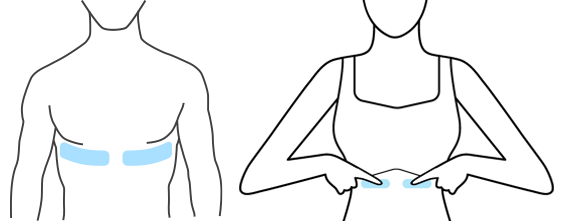
Image: two areas on the lower chest, on both sides of the middle, where to dampen the skin.
- Fasten the strap. Fasten the textile strap around your lower chest and adjust the strap until the strap stays securely in place.
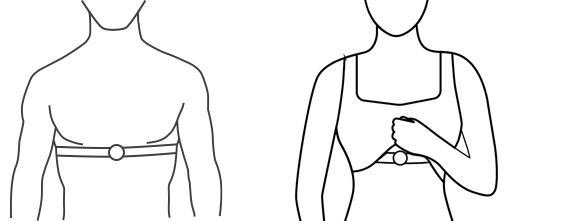
Image: the strap around the lower chest with the Sensor in the middle of the chest.
- Attach the Sensor. Attach the Sensor to the strap with the text of the Firstbeat logo facing up. The Sensor starts recording automatically, and the LED flashes every 5 seconds while the Sensor records.
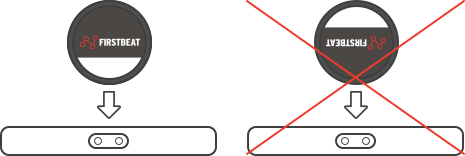
Image: the correct orientation with the logo text upright, and the crossed-out upside-down orientation.
- Rinse the strap after the session. Take off the strap, remove the Sensor, rinse the strap under cold running water and hang the strap to dry. If you use the Heart Rate Vest, the Sensor can stay in the vest between sessions.
Result
The Sensor stops recording automatically, and the data is ready to download in the Firstbeat Sports: Coach app or the Firstbeat Sports: Athlete app.
Need more help? Ask the Customer Agent chat on this page or email support@firstbeat.com.