
This article explains how an Admin can assign team access to a coach in Firstbeat Sports Cloud. Team access controls which teams, athletes and data a coach can see in Sports Cloud and in the Firstbeat Sports: Coach app.
Before you start
- You need the Admin role. Only Admins can change the team access of existing coaches. Other coaches can give access to their own teams only when they add a new coach (see How to add a coach in Sports Cloud).
- The coach must already exist in Coach Management.
- Access to new teams is never granted automatically. When a new team is created, assign access to the new team manually.
Steps
- Open Coach Management. Log in to Sports Cloud at https://sports.firstbeat.com, click your profile picture in the top-right corner and select COACH MANAGEMENT.
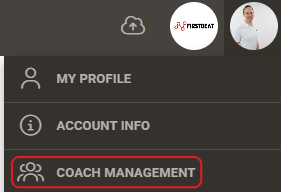
Screenshot: the profile menu under the profile picture with the COACH MANAGEMENT option.
- Select the teams. In the coach's row, open the drop-down menu in the Team access column and select the teams that the coach can access. Admin users show All teams (Admin).
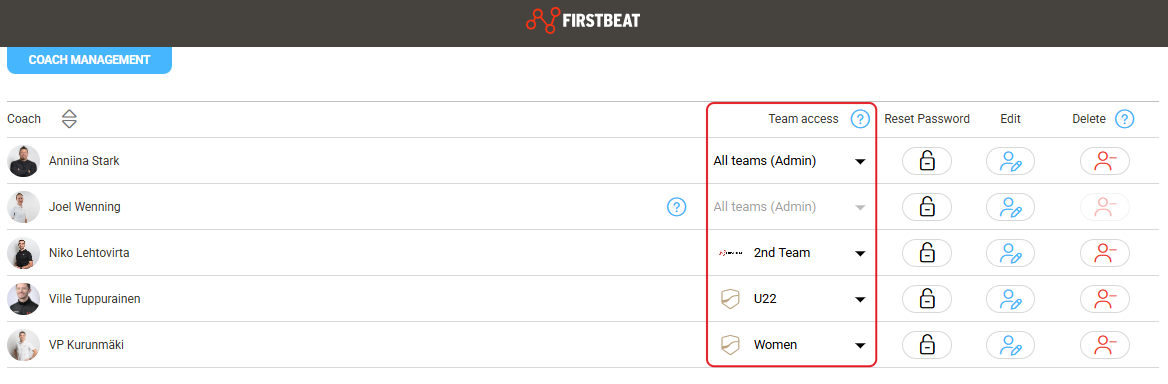
Screenshot: the COACH MANAGEMENT view with a Team access drop-down menu in each coach row.
Result
Only the selected teams are available to the coach in Sports Cloud and in the Coach app.
Need more help? Ask the Customer Agent chat on this page or email support@firstbeat.com.