
Coach access rights control which teams, athletes and data each coach can access in Firstbeat Sports Cloud and in the Firstbeat Sports: Coach app. An Admin assigns each coach access to specific teams.
User roles
- Admin: full access to all teams, athletes, sessions, coaches and account settings. An Admin manages coach access rights.
- Coach: access only to the teams that an Admin assigns. A coach cannot change account-level settings.
What a coach can access
- A coach can access the assigned teams, the athletes in those teams, and athletes who are not assigned to any team.
- Without team access, a coach still sees team names and photos, athlete names, photos and team associations, and other coach users.
- For restricted teams and athletes, a coach cannot see athlete reports, measurements, analysis results, session data, athlete profile details or data exports.
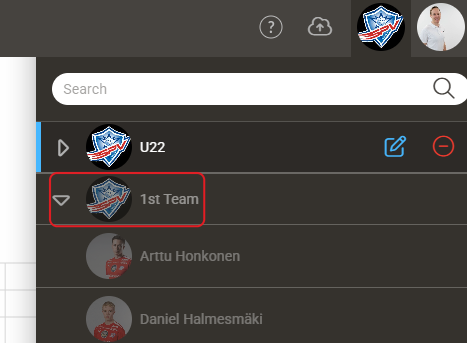
Screenshot: the team drop-down list in Sports Cloud, where a team the coach cannot access appears greyed out.
What a coach can and cannot do
A coach can:
- Create athletes and add them to their own teams.
- Edit or delete athletes who are in their teams or not in any team.
- Edit their own teams and their own profile.
- Rename sessions and laps.
- Invite new coaches to their team by email.
- Add new report topics.
A coach cannot:
- Change their own team access, give access to other teams, or remove team access from Admins.
- Edit teams or athletes they do not have access to.
- Change account-wide settings, such as training zones and report settings.
Coach access rights in the Coach app
- Teams without access appear disabled in team selection. With Show All Athletes, athletes who belong only to restricted teams are filtered out, and Live view hides them when no team is selected.
- An athlete in several teams still appears if the coach has access to one of those teams.
- For an athlete in a restricted team, the coach sees the Firstbeat Sports Sensor status, serial number, firmware version and battery level, but cannot pair, unpair or update the Sensor. The coach can reset the Sensor.
- For an athlete in a restricted team, the coach cannot start the Quick Recovery Test (QRT), and the heart rate and QRT results are hidden.
Need more help? Ask the Customer Agent chat on this page or email support@firstbeat.com.