
This article explains how athletes start using the Firstbeat Sports: Athlete app with the Firstbeat Sports Sensor.
Video: introduction to the Athlete app for athletes.
Before you start
- You need the "Thank you for registering" email that you receive when your coach gives you access. If you cannot find the email or the link has expired, check your spam folder or ask your coach to send your credentials again.
- You need an iPhone or iPad with iOS 17 or later, or an Android phone with Android 11 or later.
Steps
- Create your account. Open the "Thank you for registering" email and follow the instructions to create your username and password.
- Install the app. Download the Firstbeat Sports Athlete app, not the Firstbeat Life app, from the App Store or Google Play.
- Log in. Open the Athlete app and log in with your username and password.
- Pair your Sensor. Turn on Bluetooth and location services on your phone. In the Athlete app, tap Sensor Management in the top-right corner and select your Sensor. Do not pair the Sensor in the phone's Bluetooth settings. You only need to pair the Sensor once.
- Put on the Sensor. Moisten the strap, fasten the strap around your chest and attach the Sensor with the Firstbeat logo upright.
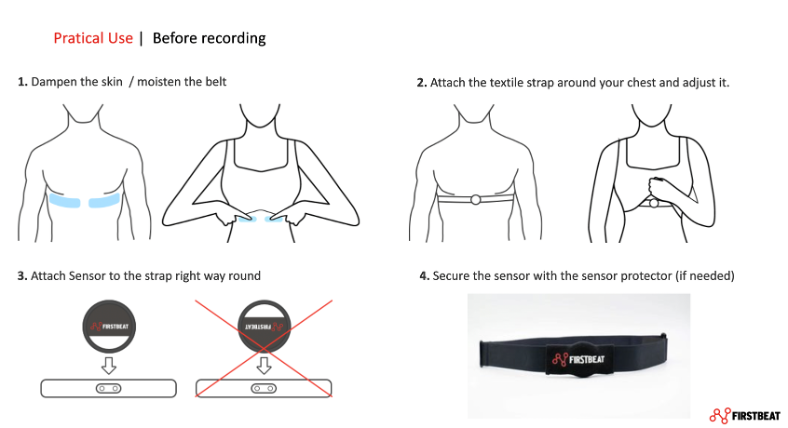
Image: instructions for putting on the strap and the Sensor before recording.
- Record, download and upload your training. The Sensor starts recording automatically when the strap is on and the Sensor detects your heart rate. After training, take off the strap and detach the Sensor. Then open the Athlete app and press the stop button, or, if the recording has already stopped, press the download notification button on the home screen. The Athlete app downloads the measurement from the Sensor and uploads it to Sports Cloud automatically when your phone is online. For details, see How to download measurement data from the Sensor to the Athlete app.
Result
Your Sensor is paired, and your training data is in Sports Cloud, where your coach can view it. You can also view your data in Firstbeat Sports Cloud at https://sports.firstbeat.com with the same username and password.
Need more help? Ask the Customer Agent chat on this page or email support@firstbeat.com.