
This article explains how athletes download measurement data from the Firstbeat Sports Sensor to the Firstbeat Sports: Athlete app and sync the data to Firstbeat Sports Cloud.
Before you start
- The Sensor is paired with your profile in the Athlete app.
- The download from the Sensor needs no internet connection. The upload to Sports Cloud needs an internet connection.
Option 1: The recording is still ongoing
- Stop the recording. Open the Athlete app and press the stop button. The Athlete app downloads the measurement data from the Sensor automatically.
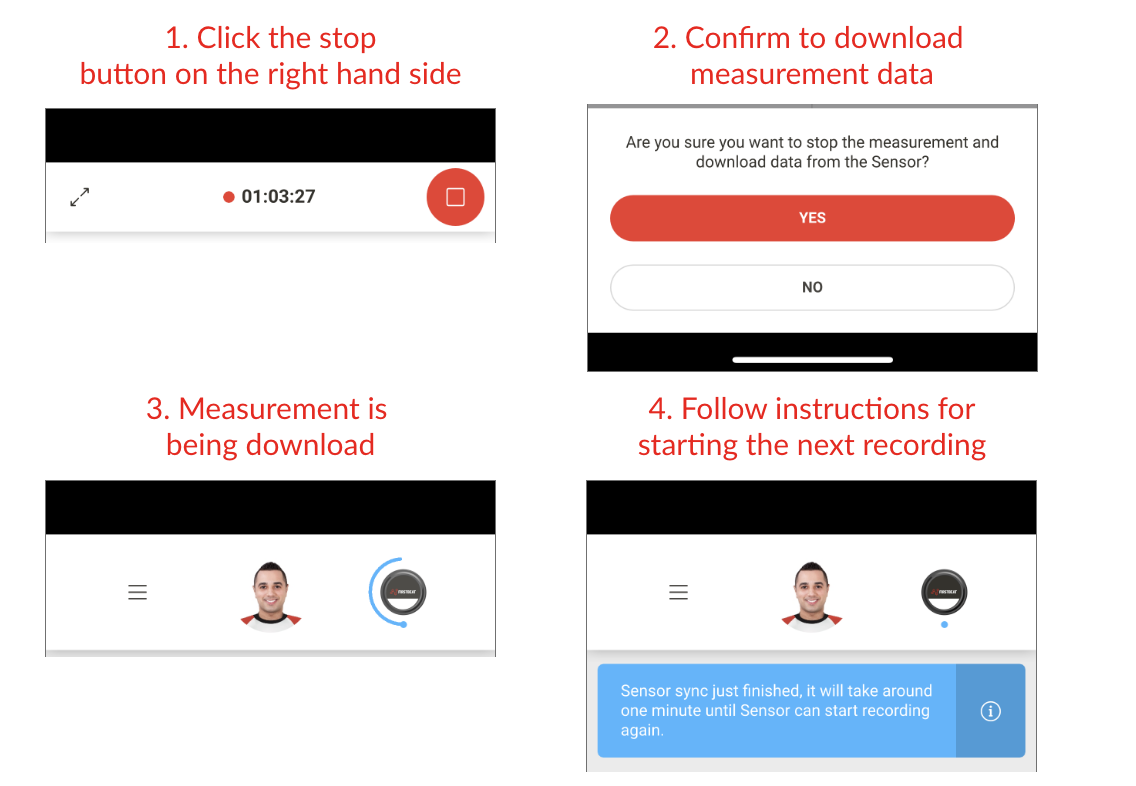
Screenshot: the Athlete app during a recording, with the stop button.
Option 2: The recording has already stopped
- Download the measurement. Open the Athlete app and press the download notification button on the home screen.
Result
The Athlete app uploads the measurement to Sports Cloud automatically when your phone is online, and your coach can view the training data in Sports Cloud.
Need more help? Ask the Customer Agent chat on this page or email support@firstbeat.com.