
The Reporting Tool is the reporting area of Firstbeat Sports Cloud where coaches view Session Reports, Training Summary Reports and Submaximal Fitness Test Reports for a team, a position or an athlete. Open the Reporting Tool with OPEN SESSION REPORT on a session in the Dashboard, or with MENU > REPORTING.
Video: Quick glance: Reporting for team training, a short overview of team training reports in Sports Cloud.
Navigation
- Team logo (top-left corner): switch between teams, positions and individual athletes.
- Reporting (chart icon): shows the Calendar and the Reports list with the Weekly Training Summary and the sessions of the selected day. Click a session to see the reports for that session.
- Fitness Testing (heart rate line icon): opens the Submaximal Fitness Testing tool and reports.
- Share icon (top-right corner of a report): opens Report Sharing to automate reports or send a single report.
- Settings icon (top-right corner of a report): opens Report Configuration to build custom Session Reports.
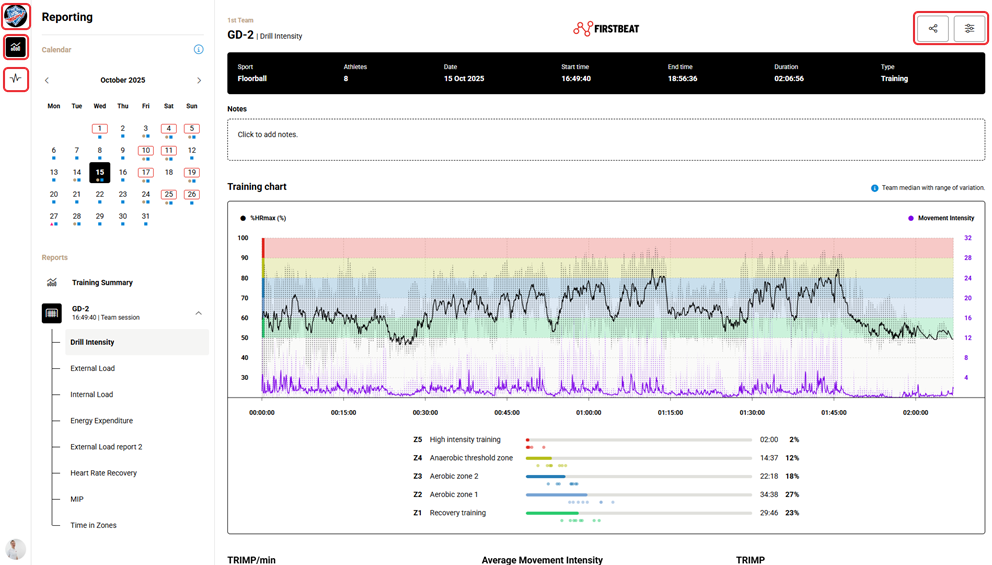
Screenshot: the Reporting page with the team logo, the Calendar, the Reports list and the share and settings icons in the top-right corner.
Calendar
- Black fill: the selected date.
- Grey fill: the current date.
- Brown dot: a team training session.
- Blue square: a measurement.
- Red triangle: a fitness test.
- Red outline around the date: a game or race.
Reports by subscription tier
- Internal Report (Internal Load in the Reports list): all subscription tiers, including Sports Standard.
- External Report (External Load) and Drill Intensity Report (Drill Intensity): Sports Premium and Sports Premium+.
- Custom Reports and the Weekly Training Summary: Sports Premium+.
- Fitness Tests: Submaximal testing add-on, available for any tier.
Athlete view
- Click the team logo and select an athlete or a position. The athlete's picture replaces the team logo.
- The athlete view shows the Weekly Training Summary, Fitness Tests, Session Reports and Measurement Reports.
- A Measurement Report includes all data from a measurement, from start to stop, and is available only in the athlete view.
- For a position, only the Weekly Training Summary is available.
Need more help? Ask the Customer Agent chat on this page or email support@firstbeat.com.