
When you merge measurements in Firstbeat Sports Cloud, Sports Cloud fills the gap between the measurements with zero (non-training) values. Sports Cloud does not create training data for the gap.
How the gap is filled
- After the gap is filled, Sports Cloud analyzes the merged measurement. The analysis includes artifact correction, which corrects faulty heartbeat data and determines how the heart rate (HR) looks in the gap.
- No R-R interval or HR data is inserted. However, the analysis often shows long gaps as 100 beats per minute (bpm), with some interpolation (decreasing HR) and flat parts depending on the gap duration.
- Movement Load in the gap is 0, and Movement Intensity is 0.00 units/min.
Example
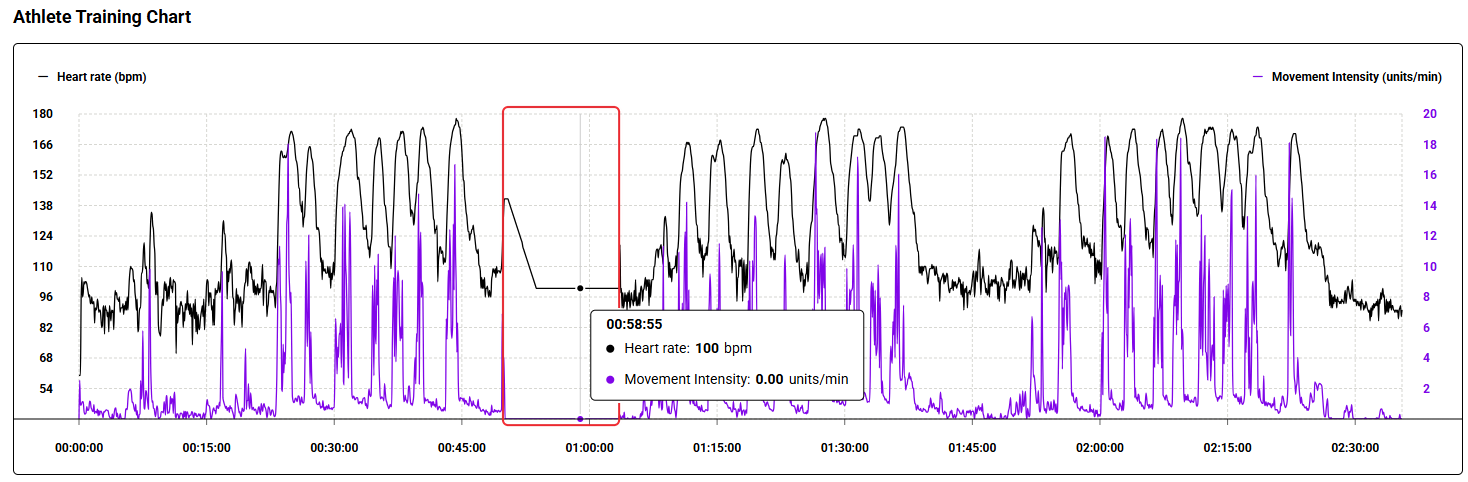
Screenshot: the Athlete Training Chart of two merged measurements, where the heart rate in the gap decreases and then stays flat at 100 bpm and Movement Intensity is 0.00 units/min.
Effect on analysis results
- An HR of 100 bpm in the gap typically does not accumulate training impulse (TRIMP).
- Average intensity metrics, such as TRIMP per minute (TRIMP/min) and Movement Intensity, are less accurate for a merged measurement with a gap.
Need more help? Ask the Customer Agent chat on this page or email support@firstbeat.com.